
CapCut alternatives after the price hike (2026)
I tested 5 alternatives across desktop and mobile. They don't all replace CapCut equally. CapCut was uniquely positioned: fast templates, decent AI tooling, TikTok integration, mobile workflow. No single app covers every corner of that. But several come close enough that the switch is worth making.
ALTERNATIVES
Derek Callahan
6/4/20267 min read
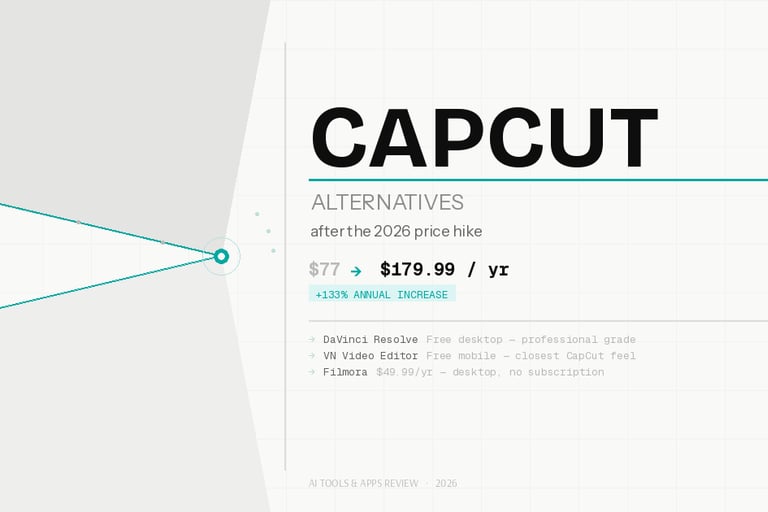
I checked my email in January and saw the notification. CapCut was raising its annual Pro subscription from $77 to $179.99. Effective February 20, 2026.
That's a 133% price increase. Overnight. With no formal announcement.
And it wasn't just the sticker price. Features that used to ship free (auto-captions, 1080p exports, background removal) got moved behind the new paywall. The monthly plan doubled from $9.99 to $19.99. The free tier got noticeably thinner. And somehow, all of this landed while the app was in the middle of a data center outage.
I understand that ByteDance needs to monetize. But there's a way to do it that doesn't feel adversarial. This wasn't it.
So I spent the past several weeks testing alternatives. Here's what I actually found.
What changed
CapCut restructured into 3 tiers: Standard ($89.99/year, mobile only), Pro ($179.99/year, mobile + desktop + web), and Team ($24.99/month per seat).
The restructuring is the real problem. Desktop editing now requires the top-tier Pro plan. Auto-captions, 4K export, background removal — all gated behind it. The Standard plan is mobile-only, which means anyone who has been editing on desktop faces a forced upgrade or a forced exit.
Features that were free in 2024 are now paid. That's the part that stings most. CapCut built its audience by giving things away, then quietly clawed them back one update at a time. The February cliff just made it impossible to ignore anymore.
What people are saying
The backlash hit fast. On r/CapCut, one thread went viral for calling out the company for "locking 1080p and 60fps behind a paywall" while hiking prices — with "no apology, heads up or acknowledgment" for the outage happening at the same time. The same thread called out the sheer audacity of announcing a price hike while the app was broken.
A second thread, "Pro price increase is the DEATH of CapCut," racked up 200+ upvotes. One commenter in that thread made the point clearly: "other video editors export at 1080p and 60fps for free." Hard to argue with that.
Search interest backed it up too. Searches for "capcut pricing" hit 18,100 in April 2026, up from 5,400 a year earlier. "Capcut alternatives" is now at 2,900 monthly searches. People are looking.
What third-party review platforms say
CapCut's Trustpilot score tells a clearer story than any press release. 897 reviews. 1.2 out of 5. 89% are 1-star ratings.
That's not a bad quarter. That's a systemic problem with how the company treats customers.
User Viktor Lundbøl Leth wrote on Trustpilot: "I used to love CapCut — fast, simple, mobile-friendly editing. But after their latest price hike, I'm done. They doubled their subscription price without adding any new features."
Chloé Gates was more direct: "Capcut is corporate greed at its finest. ALL features started out free... as time passed, now anything that isn't just trimming a video is now a paid subscription."
After seven years of using the app, Jazargo left a 1-star review and moved on: "Locking previously free features behind a paywall feels greedy and unfair to long-time users. It's sad it came to this, but the trust is gone."
The common threads across all the negative reviews: surprise charges, billing loops that are nearly impossible to cancel, no human support (just automated replies), and a free tier that now feels like a trap designed to get you to upgrade mid-project.
Chris Cannon's review captures that last one perfectly: "CapCut's desktop version, while stating it is free, quietly lets you build everything — then hits you with the 'Pro export' wall if you've used even one premium animation, font, or effect. None of it looks labeled as premium. A total waste of my time."
The alternatives
I tested 5 alternatives across desktop and mobile. They don't all replace CapCut equally. CapCut was uniquely positioned — fast templates, decent AI tooling, TikTok integration, mobile workflow — and no single app covers every corner of that. But several come close enough that the switch is worth making.
1. DaVinci Resolve
Price: Free / $295 one-time for Studio
DaVinci Resolve is the obvious desktop pick. The free version exports in 4K with no watermark, includes professional color grading, multi-track audio editing, and a full visual effects suite (Fusion). For most creators, the free tier has almost no meaningful limitations.
The Studio version costs $295 as a one-time purchase, not a subscription. For comparison: 2 years of CapCut Pro now costs $360. Do the math.
The honest downside: the learning curve is real. The interface was built for film editors, not TikTok creators. If you're used to CapCut's drag-and-drop simplicity, Resolve will feel like a different universe for the first week or two. But once it clicks, you won't go back.
What I like:
Completely free with 4K export and no watermark
Industry-standard color grading tools
One-time Studio purchase instead of a subscription
Windows, Mac, and Linux support
What I don't like:
Steep learning curve, especially coming from CapCut
No meaningful mobile editing option
Overkill for short social clips you want to knock out in 10 minutes
DaVinci Resolve on G2: 4.7/5 based on 203 reviews. Reviewers consistently praise the color tools and the free tier's depth. One reviewer put it plainly: "For a 'FREE' program this is the MOST impressive video editing software I've used in over 30 years." The main complaint is the same one I have: it's a heavy app for light jobs.
2. VN Video Editor
Price: Free
VN is the app I keep recommending to people who want to leave CapCut without dealing with a major adjustment period. It's fully free, watermark-free, and includes auto-captions without a paywall. On mobile. No subscription.
Across r/VideoEditing discussions, VN consistently comes up as the best mobile CapCut replacement. I'd agree with that. The workflow is familiar enough that the transition doesn't feel disorienting. Vertical format presets, text overlays, transitions, music — it's all there.
I'm not certain how it holds up at scale for creators doing high-volume posting, since I've only tested it on a limited set of projects. But for personal and small-creator use, it's genuinely impressive for a free app.
What I like:
Completely free with no watermarks
Auto-captions included without any paid tier
Mobile-first design that feels familiar to CapCut users
Available on iOS and Android
What I don't like:
Desktop version is limited
Fewer templates than CapCut
AI tooling is more basic
3. Canva Video
Price: Free tier / $144 a year for Pro
Canva is a design tool that also does video. Worth being upfront about that. If you're making Reels or Shorts with text-heavy graphics, branded visuals, and template-driven content, it's actually excellent. If you're cutting a multi-track talking-head video with background music, you'll hit its limits fast.
The $144/year Pro plan is $36 cheaper annually than CapCut Pro. And unlike CapCut, Canva's ToS doesn't claim rights to your content. For creators who got spooked by CapCut's Terms of Service over the past couple of years, that matters.
What I like:
Massive template library tailored to social formats
Brand kit for consistent visuals across projects
Content ownership terms are cleaner than CapCut's
$36/year cheaper than CapCut Pro
What I don't like:
Limited timeline control for complex edits
Video-specific AI tools are weaker than CapCut's
More design platform than video editor
Canva on G2: 4.7/5 from 7,500 reviews — genuinely strong. On Trustpilot, the score drops to 3.5/5 from 4,000 reviews, mostly due to billing complaints that mirror CapCut's issues. The product itself scores well; the support doesn't.
4. VEED
Price: Free tier available / paid plans from ~$18/month
VEED runs entirely in your browser. No install, no version updates, no storage hit on your machine. You upload footage, edit, add captions, and export — all in a browser tab.
The auto-subtitle tool is where VEED earns its place. It's fast, accurate, and customizable. For creators whose main use case with CapCut was "add captions, trim the dead air, export" — VEED handles that workflow cleanly.
The tradeoff is speed. Browser-based editing is slower than native desktop apps for anything heavier than a few minutes of footage. And the free tier has export limits that push you toward paid plans sooner than you might want.
What I like:
No installation required, works across any device
Strong auto-caption accuracy
Clean, minimal interface
Good for team collaboration
What I don't like:
Slower than desktop apps for longer projects
Free tier feels limited quickly
Export quality can feel compressed on lower plans
VEED on Trustpilot: 4.1/5 from 3,000+ reviews. Users consistently like how easy it is to get started. Frustrations center on paid plan limits feeling tight.
5. Filmora
Price: $49.99/year
Filmora sits between CapCut and DaVinci Resolve in terms of complexity — more feature-rich than CapCut, far less intimidating than Resolve. At $49.99/year, it's $130 cheaper annually than the new CapCut Pro pricing.
It's desktop-first, with a clean timeline interface, good AI tools (background removal, noise reduction, auto-captions, motion tracking), and a solid template and effects library. If you've been using CapCut on desktop for longer edits and want something that feels like a legitimate upgrade, Filmora is worth a trial.
What I like:
$130/year cheaper than CapCut Pro
Better timeline control than CapCut
Strong AI feature set for the price
Available on Windows and Mac
What I don't like:
Some premium effects still require additional purchases on top of the subscription
No meaningful mobile companion app
Can drag on older hardware
Filmora on Trustpilot: 4.3/5 from 15,000+ reviews. That's one of the larger review pools on this list, and the score holds up well. Positive reviews praise the balance between power and ease of use. Negative reviews flag upsell prompts and effects that feel overpriced for what they are.
Quick comparison
Who should switch to what
For mobile creators who want the closest free CapCut feel: VN Video Editor. It's not identical, but it's close enough.
For serious desktop editing with no subscription: DaVinci Resolve. Budget a week to learn it. Worth it.
For branded social content, especially if you're already in the Canva ecosystem: Canva Pro. The video tools aren't deep, but the design system is excellent.
For browser-based editing with strong captions and no install: VEED. Especially good for short-form content.
For desktop editing at roughly a quarter of CapCut's new price: Filmora. The closest direct comparison in terms of feature depth and target audience.
I'll be direct: if CapCut had raised prices by 30% and communicated it clearly, most creators would've complained for a week and moved on. The problem here is the 133% jump, the features quietly recategorized as "Pro," the outage during the announcement, and the complete silence from ByteDance. That's a pattern, not a mistake.
The alternatives are genuinely better than they were 2 years ago. You're not settling. You're just redirecting your money toward tools that actually treat you like a customer.

Contact:
© 2026 toolpundit. All rights reserved.