
Key takeaways
- Surfshark is one of the cheapest “premium” VPNs going. The 2-year Starter plan works out to about $1.99 a month, though it renews far higher.
- Unlimited simultaneous connections is the headline feature. One account covers every phone, laptop, TV and tablet in the house.
- Speeds are genuinely fast on WireGuard. I saw almost no drop on nearby servers, and independent tests have clocked it past 700 Mbps.
- It unblocks the big streaming libraries (Netflix, BBC iPlayer, Disney+, Prime) reliably, with the odd server swap needed.
- Third-party scores back it up: 4.3/5 on Trustpilot from more than 30,000 reviews, and 4.7 on the Apple App Store from around 120,000 ratings.
- The catch is billing. Renewal prices jump hard, and most of the angry reviews are about surprise charges, not the software.
My quick verdict
I’ve tested a lot of VPNs, and most of the cheap ones feel cheap. Surfshark doesn’t. That’s the short version.
The longer version is what the rest of this review is for. It’s based on my own use plus a pile of current data: pricing I pulled in June 2026, independent speed tests, more than 30,000 Trustpilot reviews, and Reddit threads from the past year. I’ll tell you where I’m confident and where I’m not.
One thing to get out of the way first. Surfshark and NordVPN now sit under the same parent company, Nord Security. It doesn’t change much day to day, but it’s worth knowing that the two “rivals” you keep comparing are cousins.
What it actually costs
Let’s talk money, because price is the main reason people land on Surfshark in the first place.
There are three tiers. Starter is the VPN plus the CleanWeb ad blocker. One adds antivirus, a data-breach alert tool, and a private search engine. One+ piles on data-removal extras for people who want their info scrubbed from broker lists.
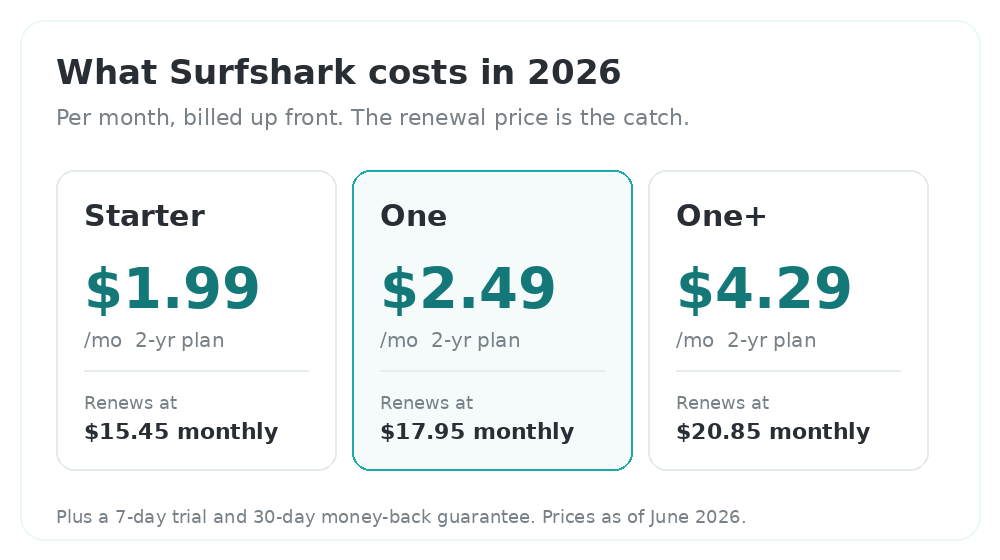
On a 2-year plan, Starter runs about $1.99 a month, One is $2.49, and One+ is $4.29. When I checked, Surfshark was also tossing in a few free months, which drags the effective Starter price closer to $1.78. For a VPN this capable, that’s cheap.
Here’s the part to watch. Those prices cover the upfront term only. Month-to-month, Starter is $15.45 and One is $17.95, so the commitment discount is huge. And renewals after your first term climb steeply. Surfshark raised its renewal prices by roughly a third during 2025, and that shows up loudly in user reviews.
My advice is simple. Buy the 2-year plan, drop a reminder in your calendar for the renewal date, and either cancel and re-sign at the new-customer rate or message support to negotiate when it comes around. It’s a faff. It’s also standard across the entire VPN business, so I don’t hold it against Surfshark specifically.
You also get a 7-day free trial on mobile and a 30-day money-back guarantee, so there’s a genuine way to kick the tyres before you’re locked in.
Speed and streaming
Speed is where Surfshark won me over. On WireGuard, connected to a server near me, I forgot it was running. Pages loaded normally, downloads stayed quick, video didn’t stutter.
The independent numbers are strong too. Testers have measured Surfshark past 700 Mbps on close servers, and TechRadar has repeatedly called it one of the fastest VPNs around. Go further afield and you’ll lose more, usually in the 15-25% range depending on the protocol and distance. That’s normal, and it’s still plenty for 4K.
For streaming, it delivered. Netflix worked across more than a dozen regional libraries in recent testing, and I got into BBC iPlayer, Disney+ and Prime Video without much fuss. Now and then a server gets flagged and you switch to another one. Every VPN I’ve used does this, so it didn’t bother me.
If you game, a nearby server gives you fine latency for casual sessions. For ranked, reflex-heavy matches you’ll still want the lowest ping you can get, which means a server close to home and realistic expectations.
The features that actually matter
Surfshark throws a lot of toggles at you. Most you’ll never touch. These are the six I’d actually point to.
- Unlimited connections. The big one. No license juggling, no “device limit reached” message. One subscription protects every gadget you and your family own.
- CleanWeb. Built-in ad, tracker and malware blocking. It noticeably cleans up the junkier corners of the web and speeds up page loads.
- Camouflage and NoBorders. These disguise VPN traffic as ordinary traffic, which is what you want on networks that try to block VPNs.
- MultiHop. Routes you through two servers for an extra layer of privacy. Niche, but nice when you want it.
- Bypasser (split tunneling). Choose which apps skip the VPN. I keep my banking app on my real connection so it stops asking me to verify a “new location.”
- Rotating IP and Alternative ID. Small extras that signal the team is still building rather than coasting.
Privacy and the “no-logs” question
On privacy, Surfshark ticks the boxes I care about. It runs RAM-only servers that wipe themselves on every reboot, and its no-logs policy has been audited by Deloitte, most recently in mid-2025.
I’ll be straight about the limits of that. An audit is a snapshot, not a forever guarantee, and “no logs” always asks for some trust in the company. Surfshark keeps a small amount of operational data to run the service. For everyday privacy, like stopping your ISP from selling your browsing or staying safe on hotel Wi-Fi, that’s more than enough. If you’re a journalist or activist with a serious threat model, read the privacy policy closely and weigh a more privacy-purist option before you commit.
On jurisdiction, Surfshark is a Netherlands-based company, which has no mandatory data-retention law. If the exact legal home matters to your decision, double-check the current details on their site, because these things move.
What I like and what I don’t
What I like
- Fast on WireGuard, close to “is it even on?” fast on nearby servers
- Unlimited devices on a single account
- Cheap up front, with a real 7-day trial and a 30-day refund window
- Clean, beginner-friendly apps on basically every platform
- Reliable streaming unblocking across the big services
What I don’t like
- Renewal prices that balloon after the first term
- A steady stream of billing complaints in public reviews
- Auto-renewal is on by default, which catches people out
- “No logs” still requires trusting the company
- Same owner as NordVPN, so it’s less independent than it looks
What third-party reviews say
I don’t want you to just take my word for it, so here’s what the wider crowd thinks.
On Trustpilot, Surfshark sits at 4.3 out of 5, rated “Excellent,” from more than 30,000 reviews. That ranks it among the top VPN brands on the platform. The split is the interesting bit: roughly 75% five-star and 9% one-star, with very little in between. When I read the one-star pile, most of it is about billing rather than the VPN itself.
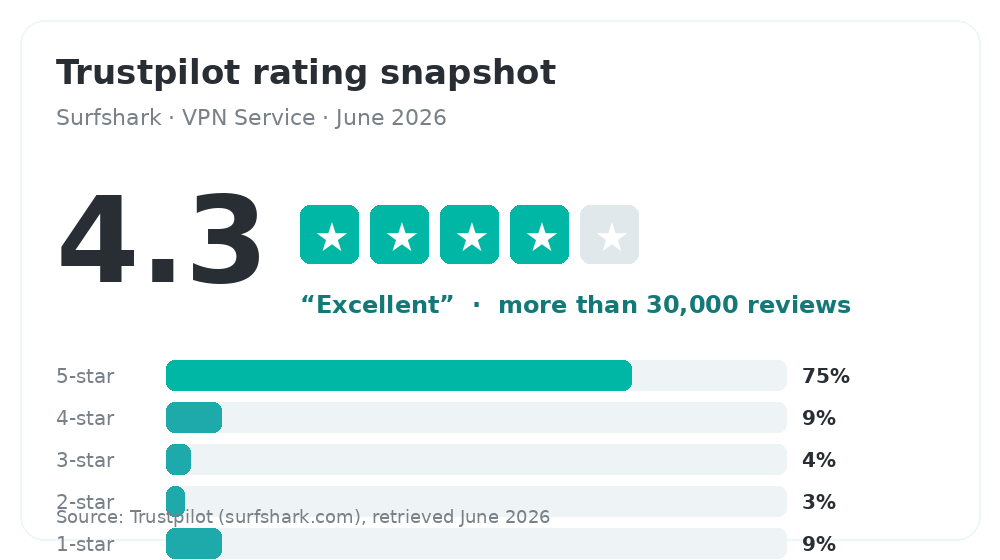
Trustpilot’s rating breakdown for Surfshark, June 2026.
The happy reviews lean on support and reliability. Doug Illman wrote: “I have been with Surfshark for years. The service is fast and trustworthy. Whenever I need to ask any questions I have always had them resolved in a timely manner.”
Michael Boettcher called it “a solid/secure service, competitively priced and easy to use,” and added that he likes the quarterly update videos. Jim Nagel kept it plain: “I like the simplicity of the VPN. I use it for my home router, my iPhone and laptop and it works well in the background.”
The unhappy reviews are worth reading too. A customer named Martin wrote, “I regret ever paying for Surfshark,” describing connection drops and email-delivery problems. The pattern across the low scores is consistent: surprise renewal charges and refund friction, not broken software.
On the Apple App Store, the mood is sunnier: 4.7 out of 5 from around 120,000 ratings. That gap between 4.3 and 4.7 makes sense to me. App-store reviews are about the app working day to day, while Trustpilot is where people go when a charge goes sideways. Read together, the two paint a fair picture: the product is well liked, the billing is where the friction lives.
What Reddit says
Reddit is where I go for the unfiltered take, so I dug through recent threads. Everything below is quoted from real comments posted in the past year, and I’ve linked each one.
The value crowd is loud. In a r/VPN_Question thread asking whether Surfshark is worth it, the original poster had signed up “about 8 months ago mainly because the price was hard to beat.” The top reply agreed:
“I’ve been using Surfshark for about a year now. Overall, I think it’s worth it…” (worth it)
The pricing gripe shows up constantly. In another “is it worth it?” thread, someone who got in at around $2.50 a month complained about the renewal jump. A commenter set them straight, and it matches what I said earlier:
“Welcome to VPN pricing. This isn’t unique to Surfshark, it’s pretty much standard across…” (standard across)
Long-term users are mostly content. On r/surfshark, a thread bluntly titled “Still OK?” drew this from a multi-year subscriber weighing whether to renew:
“Love surfshark in the time I’ve been with them. Was very close to renewing…” (still ok)
And then there’s the lukewarm middle, which might be the most honest of all. Asked point blank “what do you think about surfshark?”, the top reply was two very Reddit words:
“It’s OK.” (it’s ok)
Which, weirdly, sums it up. Surfshark isn’t the flashiest VPN on the shelf. It does the job, cheaply, and most people who buy it stick around.
Living with it day to day
Setup took me a couple of minutes. You download the app, log in, hit the big connect button, and you’re protected. The default settings are sensible, so most people never need to open the menus at all.
When you do go digging, the layout is clear. Servers are grouped by country with a search box, your favourites pin to the top, and the privacy tools each get a plain-English description instead of jargon. It runs on Windows, macOS, iOS, Android, Linux, Fire TV, and even some routers, and the apps feel like the same product rather than five different teams’ work. The browser extensions for Chrome and Firefox are handy for quick toggling, though I’d still run the full app for proper protection.
The one place I’d like more polish is the desktop app occasionally hanging on to a connection longer than I want when I quit. A handful of reviewers mention the same thing. It’s minor, and switching protocols in the settings usually sorts it.
How it stacks up against Nord and Express
Most people choosing Surfshark are also eyeing NordVPN or ExpressVPN, so here’s the quick read from my own use.
ExpressVPN is the polished, premium option. It’s reliable and dead simple, but you pay for that, and it caps you at eight devices. Surfshark matches it on the basics, beats it on price and device count, and trails it slightly on the “it just works every time” feeling.
NordVPN, Surfshark’s corporate sibling, has a bigger server network and a few extra power-user tools. Speeds between the two are close enough that I wouldn’t pick on that alone. If you want the larger network and don’t mind paying a little more, Nord makes sense. If you want unlimited devices and the lower sticker price, Surfshark wins. Since they share an owner, you’re not choosing between two truly independent companies, which is worth a thought if that matters to you.
So, should you get it?
Yes, with your eyes open.
If you want a fast, easy VPN that covers every device you own and costs less than a coffee a month up front, Surfshark is one of the best deals in the category. The apps are friendly, the speeds are real, and the streaming works. For a lot of people, that’s the whole list of requirements.
Just go in knowing two things. The low price is a first-term price, so put the renewal on your radar and manage it. And if you carry a hardcore privacy threat model, dig into the specifics before you trust any single provider, Surfshark included.
For most people, and that includes me on my own devices, it’s an easy VPN to live with at a price that’s genuinely hard to argue with.